Path Interpolation
Tip
Try it live → — Interactive Path Interpolation demo in the Blazor sample app.
Path Interpolation lets you smoothly morph one shape into another. This is perfect for creating animated transitions, loading indicators, or any UI effect where shapes need to transform fluidly.

Quick Start
using SkiaSharp;
using SkiaSharp.Extended;

// Define your start and end paths
var square = SKGeometry.CreateSquarePath(100);
var star = SKGeometry.CreateRegularStarPath(100, 40, 5);

// Create the interpolation
var interpolation = new SKPathInterpolation(square, star);

// Get paths at any point in the transition (0 to 1)
var halfway = interpolation.Interpolate(0.5f);
How It Works
The interpolation works by:
- Converting both paths to a series of points
- Matching point counts between the paths
- Interpolating each point linearly from start to end position
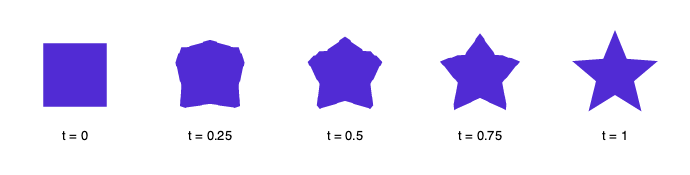
The t parameter controls the transition progress:
t = 0— Original path (from)t = 0.5— Halfway between both shapest = 1— Final path (to)
Animation Example
To animate the transition, vary t over time:
public class MorphingShape
{
    private readonly SKPathInterpolation interpolation;
    private float progress = 0f;
    private float direction = 1f;

    public MorphingShape(SKPath from, SKPath to)
    {
        interpolation = new SKPathInterpolation(from, to);
    }

    public void Update(float deltaTime)
    {
        progress += deltaTime * direction;

        if (progress >= 1f || progress <= 0f)
            direction *= -1; // Reverse at ends
    }

    public void Draw(SKCanvas canvas, SKPaint paint)
    {
        var path = interpolation.Interpolate(progress);
        canvas.DrawPath(path, paint);
    }
}
Customization
Max Segment Length
The maxSegmentLength parameter controls how finely paths are subdivided:
// Default (5 units) - good balance of quality and performance
var interpolation = new SKPathInterpolation(from, to);

// Smoother curves (smaller segments)
var smooth = new SKPathInterpolation(from, to, maxSegmentLength: 2f);

// Faster performance (larger segments)
var fast = new SKPathInterpolation(from, to, maxSegmentLength: 10f);
Smaller values create smoother morphing but use more memory and processing power.
Pre-calculating
For performance-critical animations, call Prepare() upfront:
var interpolation = new SKPathInterpolation(from, to);
interpolation.Prepare(); // Pre-calculate point mappings

// Now Interpolate() calls are faster
for (float t = 0; t <= 1; t += 0.1f)
{
    var path = interpolation.Interpolate(t);
}
Usage Patterns
Loading indicator
// Morph between simple shapes for a loading animation
var circle = new SKPath();
circle.AddCircle(0, 0, 50);

var square = SKGeometry.CreateSquarePath(80);

var loading = new SKPathInterpolation(circle, square);
Icon transitions
// Smooth transition between UI states (play → pause)
var playIcon = CreatePlayIconPath();
var pauseIcon = CreatePauseIconPath();

var transition = new SKPathInterpolation(playIcon, pauseIcon);
var currentIcon = transition.Interpolate(animationProgress);
Tips
- Similar shapes work best — Morphing between shapes with similar complexity produces smoother results
- Closed paths recommended — Both paths should be closed for predictable results
- Center your paths — Paths centered at origin (0,0) morph more naturally
Learn More
- API Reference — Full method documentation
- Geometry Helpers — Create shapes to interpolate between