Geometry Helpers
Tip
Try it live → — Interactive Shapes demo in the Blazor sample app.
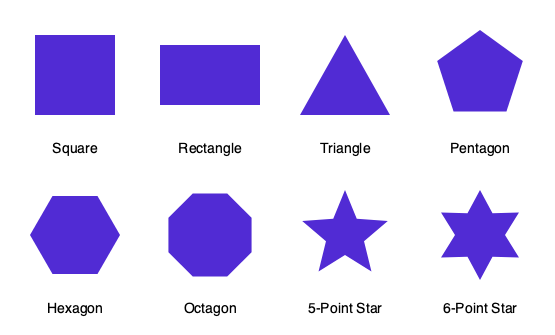
Geometry Helpers provide simple methods to create common geometric shapes as SKPath objects. Instead of manually calculating points and angles, you can generate squares, triangles, polygons, and stars with a single method call.
Quick Start
Create a shape path
using SkiaSharp;
using SkiaSharp.Extended;

// Create a 5-pointed star
var starPath = SKGeometry.CreateRegularStarPath(
    outerRadius: 100,
    innerRadius: 40,
    points: 5);

// Draw it on a canvas
canvas.DrawPath(starPath, paint);
Use canvas extension methods
// Draw shapes directly on a canvas
canvas.DrawStar(100, 100, outerRadius: 50, innerRadius: 20, points: 5, paint);
canvas.DrawRegularPolygon(200, 100, radius: 40, points: 6, paint);
canvas.DrawTriangle(300, 100, radius: 40, paint);
Available Shapes
Basic Shapes
| Method | Description |
|---|---|
CreateSquarePath(side) |
Square centered at origin |
CreateRectanglePath(width, height) |
Rectangle centered at origin |
CreateTrianglePath(width, height) |
Isoceles triangle pointing up |
CreateTrianglePath(radius) |
Equilateral triangle inscribed in circle |
Regular Polygons
Create any regular polygon by specifying the number of sides:
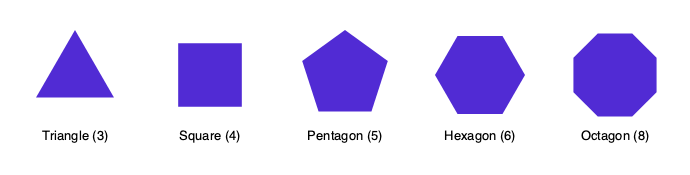
// Pentagon (5 sides)
var pentagon = SKGeometry.CreateRegularPolygonPath(radius: 50, points: 5);

// Hexagon (6 sides)
var hexagon = SKGeometry.CreateRegularPolygonPath(radius: 50, points: 6);

// Octagon (8 sides)
var octagon = SKGeometry.CreateRegularPolygonPath(radius: 50, points: 8);
Stars
Create stars with any number of points by specifying outer and inner radii:
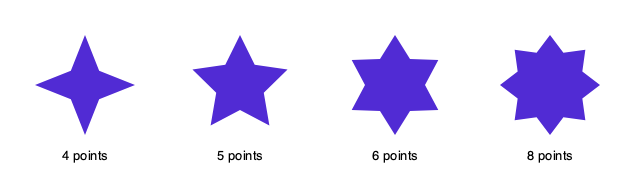
// Classic 5-pointed star
var star5 = SKGeometry.CreateRegularStarPath(
    outerRadius: 50,
    innerRadius: 20,
    points: 5);

// Star of David (6-pointed)
var star6 = SKGeometry.CreateRegularStarPath(
    outerRadius: 50,
    innerRadius: 30,
    points: 6);
The innerRadius controls how "pointy" the star is—smaller values create sharper points.
Canvas Extension Methods
For convenience, you can draw shapes directly on a canvas without creating path objects:
using SkiaSharp;
using SkiaSharp.Extended;

// Square
canvas.DrawSquare(cx: 50, cy: 50, side: 40, paint);

// Triangle (by radius)
canvas.DrawTriangle(cx: 150, cy: 50, radius: 30, paint);

// Regular polygon
canvas.DrawRegularPolygon(cx: 250, cy: 50, radius: 30, points: 6, paint);

// Star
canvas.DrawStar(cx: 350, cy: 50, outerRadius: 30, innerRadius: 12, points: 5, paint);
Utility Methods
The SKGeometry class also provides utility methods for geometric calculations:
| Method | Description |
|---|---|
CirclePoint(radius, radians) |
Get a point on a circle at the given angle |
Area(polygon) |
Calculate the area of a polygon from its points |
Perimeter(polygon) |
Calculate the perimeter of a polygon |
PointAlong(a, b, pct) |
Get a point along a line between two points |
// Get a point on a circle
var point = SKGeometry.CirclePoint(radius: 100, radians: Math.PI / 4);

// Calculate polygon area
var points = new[] { new SKPoint(0, 0), new SKPoint(100, 0), new SKPoint(50, 100) };
var area = SKGeometry.Area(points);
Customization
Path Direction
All shape methods accept an optional SKPathDirection parameter to control winding order:
// Clockwise (default)
var cwPath = SKGeometry.CreateSquarePath(50, SKPathDirection.Clockwise);

// Counter-clockwise
var ccwPath = SKGeometry.CreateSquarePath(50, SKPathDirection.CounterClockwise);
This is useful when combining paths or creating holes with path operations.
Centering
All paths are created centered at the origin (0, 0). To position them, use Offset:
var path = SKGeometry.CreateRegularStarPath(50, 20, 5);
path.Offset(centerX, centerY);
canvas.DrawPath(path, paint);
Or use the canvas extension methods which take position parameters directly.
Learn More
- API Reference — Full method documentation
- SKGeometryExtensions — Canvas extension methods