Blur Hash
Tip
Try it live → — Interactive BlurHash demo in the Blazor sample app.
Blur Hash is a compact representation of an image placeholder. Instead of loading a grey box while your image loads, you can show a colorful blur that hints at the final image—all from a tiny string that's only 20-30 characters.
| Original | Blur Hash Placeholder |
|---|---|
 |
 |
The hash for this image is just 28 characters: LjPsbRxG%gx^aJxuM|W=?^X8Mxn$
Quick Start
Encode an image
using SkiaSharp;
using SkiaSharp.Extended;

using var bitmap = SKBitmap.Decode("photo.jpg");
string hash = SKBlurHash.Serialize(bitmap, 4, 3);
// Returns something like: "LjPsbRxG%gx^aJxuM|W=?^X8Mxn$"
Decode a placeholder
var placeholder = SKBlurHash.DeserializeBitmap(hash, 32, 32);
// Use this blurred bitmap while the real image loads
How It Works
Blur Hash uses a technique similar to JPEG compression called the Discrete Cosine Transform (DCT). It extracts the dominant color patterns from an image and encodes them into a short ASCII string.
The componentsX and componentsY parameters control how much detail is captured:
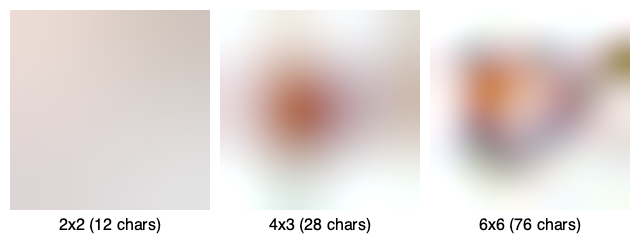
More components = more detail, but a longer string. For most use cases, 4x3 is a good default.
Customization
Components
The component count (1-9 for each axis) determines the level of detail:
| Components | String Length | Best For |
|---|---|---|
| 2x2 | ~12 chars | Simple gradients |
| 4x3 | ~28 chars | Most images (recommended) |
| 6x6 | ~76 chars | Complex images with fine detail |
Punch
The punch parameter adjusts the contrast of the decoded image. Values greater than 1.0 make colors more vibrant:
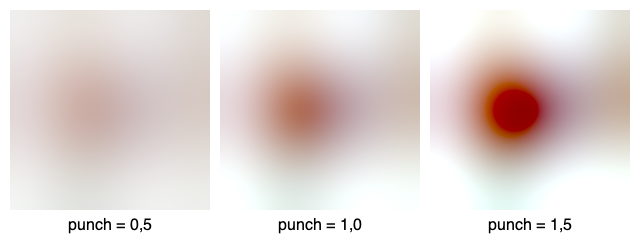
// Default punch (1.0)
var normal = SKBlurHash.DeserializeBitmap(hash, 32, 32);

// More vibrant (1.5)
var vibrant = SKBlurHash.DeserializeBitmap(hash, 32, 32, punch: 1.5f);
Placeholder Size
The decoded placeholder doesn't need to match your final image size. A small size like 32x32 is usually sufficient—it will be scaled up and displayed blurred anyway.
Usage Patterns
Include in API responses
Pre-compute hashes on your server and include them with image URLs:
{
  "imageUrl": "https://example.com/photo.jpg",
  "blurHash": "LjPsbRxG%gx^aJxuM|W=?^X8Mxn$",
  "width": 1920,
  "height": 1080
}
MAUI value converter
Create a converter to decode blur hashes directly in XAML bindings:
using System.Globalization;
using SkiaSharp;
using SkiaSharp.Extended;
using SkiaSharp.Views.Maui.Controls;

public class BlurHashConverter : IValueConverter
{
    public int Width { get; set; } = 32;
    public int Height { get; set; } = 32;

    public object? Convert(object? value, Type targetType, object? parameter, CultureInfo culture)
    {
        if (value is string hash && !string.IsNullOrEmpty(hash))
        {
            var bitmap = SKBlurHash.DeserializeBitmap(hash, Width, Height);
            return (SKBitmapImageSource)bitmap;
        }
        return null;
    }

    public object? ConvertBack(object? value, Type targetType, object? parameter, CultureInfo culture)
        => throw new NotImplementedException();
}
Then use it in XAML:
<Image Source="{Binding BlurHash, Converter={StaticResource BlurHashConverter}}" />
Learn More
- BlurHash.sh — Official demo and explanation
- BlurHash GitHub — Original algorithm by Dag Ågren at Wolt
- How Wolt created BlurHash — The origin story
- API Reference — Full method documentation